How does it work?
The Playfull Mission system works by leveraging game events to track user progress and determine the completion of configured missions. Here’s an overview of how it typically operates:
Note:
- All mission configurations can be submitted through the developer portal. Playfull team will review them before releasing to users.
- As a developer, your main responsibility is to integrate with the Playfull Events API and send the required game events and player identifiers. These are used by Playfull to track progress and determine mission completion.
Defining Missions: Game developers define a set of missions within the game. Missions can vary in complexity, objectives, and requirements. Each mission is configured with specific conditions that need to be met for completion.
Defining Game Events: Game developers determine what events are needed to track the progress and completion of the defined set of missions. The game sends these events to the Playfull Events API based on user actions, interactions, or achievements. These events can include actions like completing a level, defeating an enemy, earning points, collecting items, reaching a milestone, or any other significant in-game activity.
Defining Account Identifiers: To map the game-specific user IDs to Playfull user accounts, there needs to be at least one account identifier sent to our Events API. We use identifiers (such as email) to make an association between the game’s user ID and a Playfull user account. If a game user is sent with a certain email and we have a Playfull user with the same verified email, we will connect this Playfull user to the specified game user ID automatically. Games can create users in our system by sending a request to our Events API including both the userId and at least one identifier. You can see details here, including a full list of available identifiers. It is good practice to send these requests on user sign up and sign in. Once that is done, the Game Events can be sent to our system using only the game’s userId.
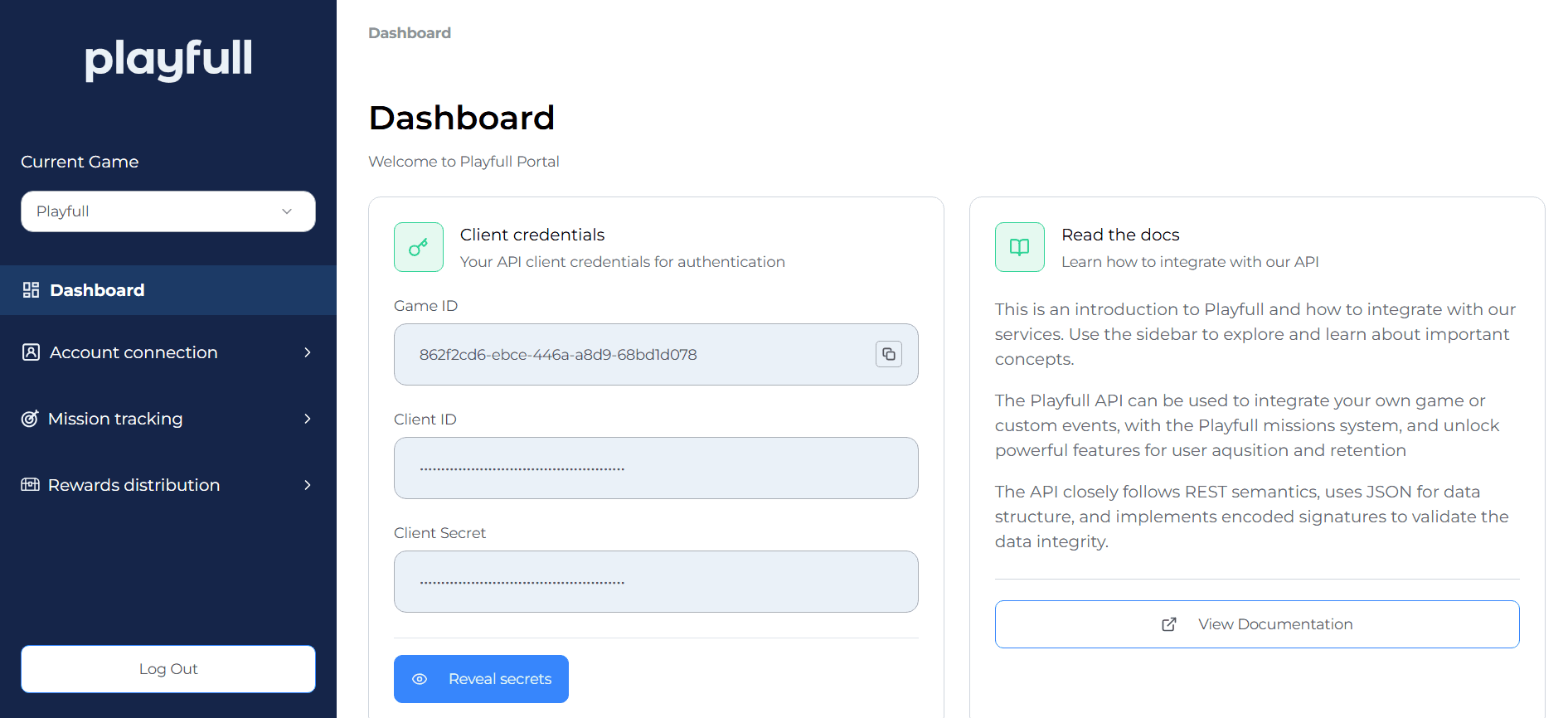
Playfull Portal Access: Create an account on Playfull as a normal user would, then contact your account manager with your Playfull account email and the Playfull team will grant you Playfull portal access. You can then access the Playfull Portal. You should then be able to login and see your dashboard with your Game ID, Client ID, and Client secret:
Sending Event API Requests: You can now start sending Event API requests as outlined here. To verify users and events have been properly received and stored in our system you can view them in the portal. Users (and their identifiers) sent to the Events API can be viewed under Account connection -> Users in the portal here. Events sent to the Events API can be viewed under Mission tracking -> Events in the portal here. Also be sure to configure your identifier settings under Account connection -> Identifier settings in the portal here.
Mission Configuration and Submission: Once you verify that users and events are being properly received and stored, you can configure your missions in our system via the portal. New missions can be created using the “Create mission” button under Mission tracking -> Missions in the portal here. Under Mission Type, select “Has Game Account” for missions that only check if the user has a connected identifier matching a Playfull user account. For all other missions utilizing in-game events, use “Custom Event.” You can then fill in basic mission information including title and description. A preview of the mission is displayed at the bottom of the page for your review. The “Mission Completion Configuration” section determines exact completion logic:
- Event Name: The exact name of the event sent to our Events API (convention is all caps with underscores like
MATCH_ENDED). See additional details here. - Event Period:
- All Time: Event could have been received at any time to be eligible for completion, including before the mission was active in our system.
- Mission Period: Event must have been received during the time the mission is active to be eligible for completion.
- Interval: Used for repeatable missions that can be completed multiple times. How often the mission can be completed can be configured under Repeat Cadence.
- Aggregation Type: How events will be processed to determine mission completion. The most common and basic configuration is “Count” with a Target Value of 1, meaning the mission will be completed if 1 matching event is receive for the user. If the Target Value is 2, then 2 events must be received by the system in order to complete the mission for the user.
- Count: How many events need to be received to complete the mission. Target Value is the number of events that need to be received.
- Sum: Aggregate sum of a certain numeric trait that needs to be received to complete the mission. Target Value is the total trait sum that needs to be received.
- Min: Minimum of a certain numeric trait that needs to be received to complete the mission. Target Value is the minimum trait value that needs to be received.
- Max: Maximum of a certain numeric trait that needs to be received to complete the mission. Target Value is the maximum trait value that needs to be received.
- Count Consecutive: Consecutive count of a certain trait that needs to be received to complete the mission. Target Value is the consecutive count that needs to be received.
- Count Unique: Unique count of traits for a specific event name that needs to be received to complete the mission. Target Value is the unique count that needs to be received.
- Target Value: See above.
- Repeat Cadence: Only when Event Period is “Interval,” with “Daily” if the mission can be completed every day (once per day) and “Weekly” if it can be completed once per week.
- Event Traits Filter: Allow trait filter to only count events that match the configured criteria. See more about traits here and more about how to submit traits here.
- Trait Type: The type of the trait being submitted. Note that “Event Value” is submitted differently that other traits, see more about event value here and more about how to submit event value here.
- Trait Name: The exact name of the trait being submitted.
- Evaluation Type: How the trait will be evaluated.
- Value: The exact value for the trait in order for the event to qualify for mission completion.
- Available Identifiers: The identifiers used for this mission. You can then configure the CTA and assets (like mission image), add any notes you want to make to the Playfull team about the mission and review the preview at the bottom. If everything looks good, you can save all changes and submit the mission to the Playfull team for review. Once the mission is in review, the Playfull team will move it to QA where you can test the entire end-to-end user flow and ensure everything is working as intended. Then the mission is ready to go live with your approval.
Event Evaluation: The captured game events are evaluated against the conditions set for each mission. While the user is active on the Playfull platform, the Mission system tries to sync the state of the mission to see if the received game events for the user align with the requirements specified for each mission. For example, if a mission requires the user to defeat 10 enemies, the system might check if the user has triggered the event for defeating an enemy 10 times.
Mission Completion: Once the user’s actions fulfill the conditions of a mission, the Mission system marks the mission as completed.
Reward Distribution: Upon mission completion, the user will receive a prompt to claim their rewards. The Mission system manages the distribution of these rewards, providing a sense of accomplishment and incentivizing users to continue engaging with the game.
Progress Tracking: The Mission system only updates the user’s ongoing progress toward each mission, when it receives a sync request. This typically happens when a user visits the Playfull platform. But even if the sync does not happen until after the mission timer has expired, it will still evaluate the game events that were sent during the mission duration and correctly mark the Mission as either completed or failed.
Mission Updates and Refresh: Game developers can periodically update or refresh the available missions to offer new objectives and keep the experience engaging for users. This may involve adding new missions, modifying existing ones, or introducing time-limited or seasonal missions.
By utilizing game events to track user actions and progress, the Mission system creates a dynamic and interactive gameplay experience. It motivates users to engage with specific objectives, offers a sense of accomplishment upon mission completion, and provides ongoing goals to pursue, enhancing user retention and enjoyment in the game.